
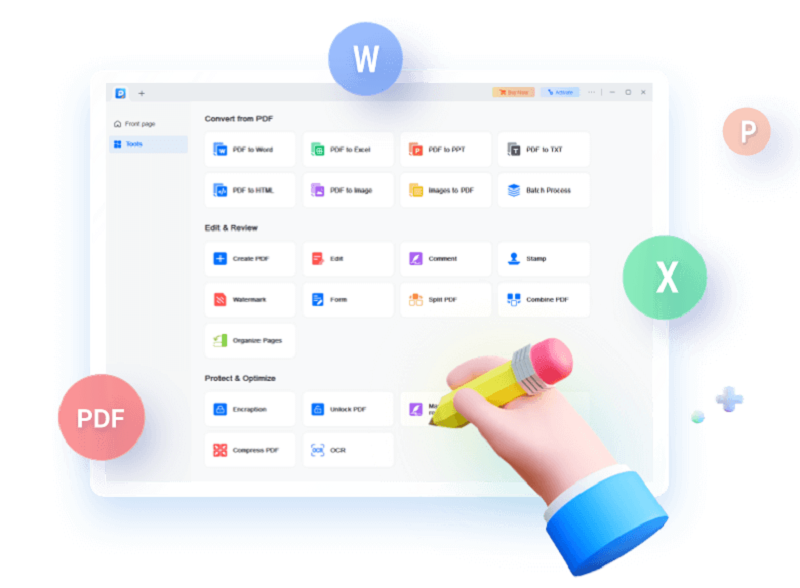
All-in-One PDF Maker, Reader, Editor and Converter
- Convert PDF files to Excel, Word, PowerPoint, images or vice versa
- Edit, OCR, merge, split, compress, create and annotate your PDFs
- Sign, print, encrypt, remove password and add watermark to PDF
Convert PDF to Word, Image and More, in No Time
- Create from Most Common File Formats
PDF is so reliable - whatever device you are using,the original fonts, pictures and other layout of the document will look the same everywhere. Now you can use EaseUS's PDF editing software to easily create a blank PDF or convert your images,Office files and other popular files to PDF,while keeping original content and format unchanged. - Convert PDF File to 10+ File Formats
PDF is popular, but you may need different file formats for your daily use.EaseUS PDF Editor can quickly convert your PDF file to the most common formats, including doc, docx, xls, xlsx,ppt,pptx,png,bmp,tif,jpg and jpeg,without losing original fonts,images and formatting. - Make Scanned PDF Files Editable
Editing text in a scanned document is so easy! Featuring OCR (Optical Character Recognition) technology, this PDF converter can recognize and convert image-based PDF to editable format. It can accurately detect and convert as many as 29 languages,such as English,French,German,Italian, Korean, Japanese,etc.
Create or Edit PDF as You Like
- Edit PDF Confidently
PDFs are hard to edit, and that's by design. No worries. EaseUSmakes PDF editing a piece of cake - add, modify or remove text,images and links in PDF as you want. You can also insert.delete, reorder, extract, crop, rotate pages or change pdf pagesize with ease. In addition, you can add headers, footers andpage numbers to your PDF in no time. - Collaborate Like Never Before
Team members now can easily collaborate on PDF. Simply addcomments, boxes, arrows, lines and other highlights to point outand explain the important content of the document, createbookmarks for pages for quick navigation, even send PDF file toyour team members via email in a snap. - Customize PDF Forms Painlessly
Create a new fillable PDF form for questionnaire or any otherneeds without hassle.This PDF editor software provides 6interactive form controls, including push button, check box, radiobutton, combo box, list box and text field, helping you easilycustom fillable forms. You can also export and import data to fillout multiple PDF forms with one click.
Manage and Secure PDF Files with Ease
- Combine Multiple PDFs Effortlessly
Having trouble handling multiple files like PDFs and images? You can use EaseUS PDF Editor as a free PDF merger to quickly combine them into one PDF which is easy to organize, share, search, or send out for review. - Reduce the Size of PDF with Zero Loss
It might be painful if your PDF file is too large to be sent via email or uploaded to the web. But it is a thing of the past, thanks to the Compress feature of EaseUS PDF maker. EaseUS can quickly reduce the size of PDF files while remaining original quality. It's just a click away. - Split PDF as You Like
Only need part of pages from a large PDF file? Now, with this PDF editor for Windows, you can easily split a PDF file into individual files, or just extract some pages of it by your needs. It is also available for splitting PDF according to the file size and top-level bookmarks as well. - Sign Your PDF Digitally
Add your e-signature to your documents, invoices and contracts by using the Add Image feature. In addition, you can also sign PDF with your digital ID which contains location, date, time and more. You can also remove signature from PDF if you don't want to keep it. - Batch Print Multiple PDFs
As a frequent business report processor, you may need to print multiple PDF documents at once. Our PDF Editor is designed to cater to this demand. It comes with an intuitive function that allows batch printing, making your document management more efficient and time-saving. - Set a Password for Your PDF
Simply add a password to your PDF document, to protect your information from unauthorized viewing, copying, editing, signing, extracting and printing. If you need, you can also easily remove password from PDF. - Add Watermark
You can add text or image to your PDF pages as watermark, and freely set its rotation, opacity, size, location and position. If you don't want to keep the watermark on your PDF, you can also remove it with ease.
More Useful Features of EaseUS PDF Editor
- Search & Replace
Quickly find and replace specified text in your PDF document. - Change Background
Set any image or color as background or remove background from PDF. - Bates Numbering
Add bates numbers to multiple PDFs for easy identification and retrieval. - Read PDF
View your PDF files with a lot of reading options, like rotating, zooming, etc.
The Best PDF Editor Perfect for Any Industry
- Manufacturing
PDFs are widely used by manufacturing industry. Use OCR feature to convert engineering drawings and scanned files into editable files. Create product instructions or end-user manuals effortlessly. - Real Estate
In real estate industry, an immense amount of documents are involved every day. Thanks to e-signature, annotation and OCR feature, it allows users to smoothly create and sign invoices, orders and contracts. - Education
With powerful editing and conversion features, EaseUS PDF Editor helps educators/trainers quickly modify courseware and export document data instantly. Also, its form tools can be useful for creating and filling enrollment application. - Financial Industry
This PDF editing software is packed with powerful conversion, form and management tool, aiming to save users' time in processing financial transactions, investment performance reports, and clients’ financial standing. - Legal
Save time and reduce errors in creating contracts or other legal forms and gathering signatures. Secure sensitive information by setting a password for PDFs. And add bate numbers to documents to quickly identify or retrieve each document and page. - Professional Services
Professional services might involve a wide range of careers, including architects, consultants, accountants, etc. Whoever they are, they can easily create, convert, review, and annotate PDFs for their services.
Operating System:
Windows 11/10/8.1/8/7
Write Your Own Review
Related Products
Check items to add to the cart or